A hardened small-business datacenter — from bare metal to live hypervisor — in one week.
HP ML350p Gen8
Drives in RAID 5
Total storage
DDR3 ECC RAM
Instructor: Anthony Pena · [email protected]
S/N 2M251705M9 · Product 736983-S01
One physical server hosting multiple virtual machines — a Windows domain controller, a Linux web stack, a database, a jump box.
Three zones: management, DMZ, and private LAN — isolated by firewall rules on the Proxmox host itself.
Hardware documentation, asset tracking, a Packet Tracer diagram, and a live walkthrough on demo day.
This deck shows what we accomplished through end of Week 1 and what's coming next.
| Manufacturer | HP |
| Model | ProLiant ML350p Gen8 |
| Product ID | 736983-S01 |
| Serial # | 2M251705M9 |
| Form factor | 5U Tower (rack convertible) |
| BIOS | P72 · 08/02/2014 |
| Chassis features | Hot-plug drives, redundant PSU, hot-plug fans |
| Management | iLO 4 (dedicated RJ-45) |
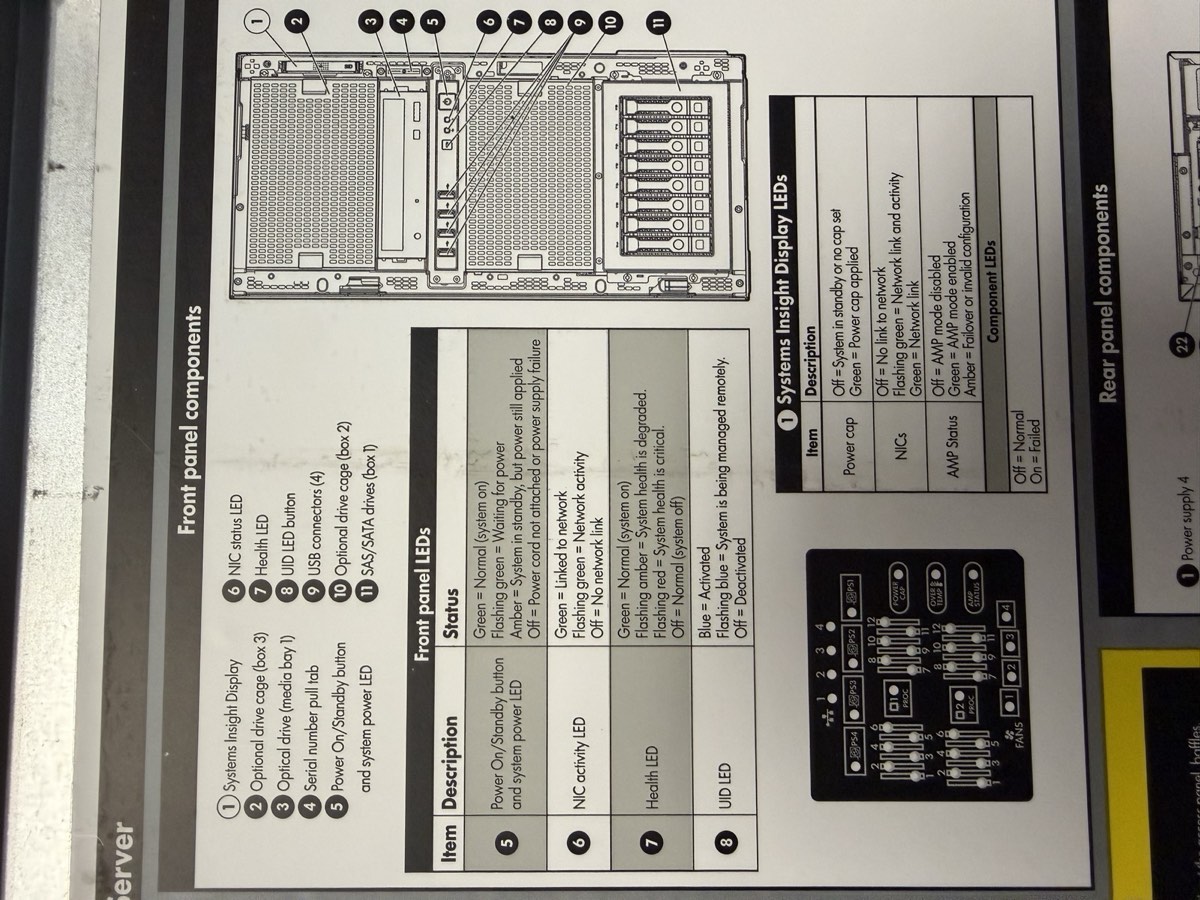
Front panel — Systems Insight Display, drive cage, USB, serial pull-tab, power button
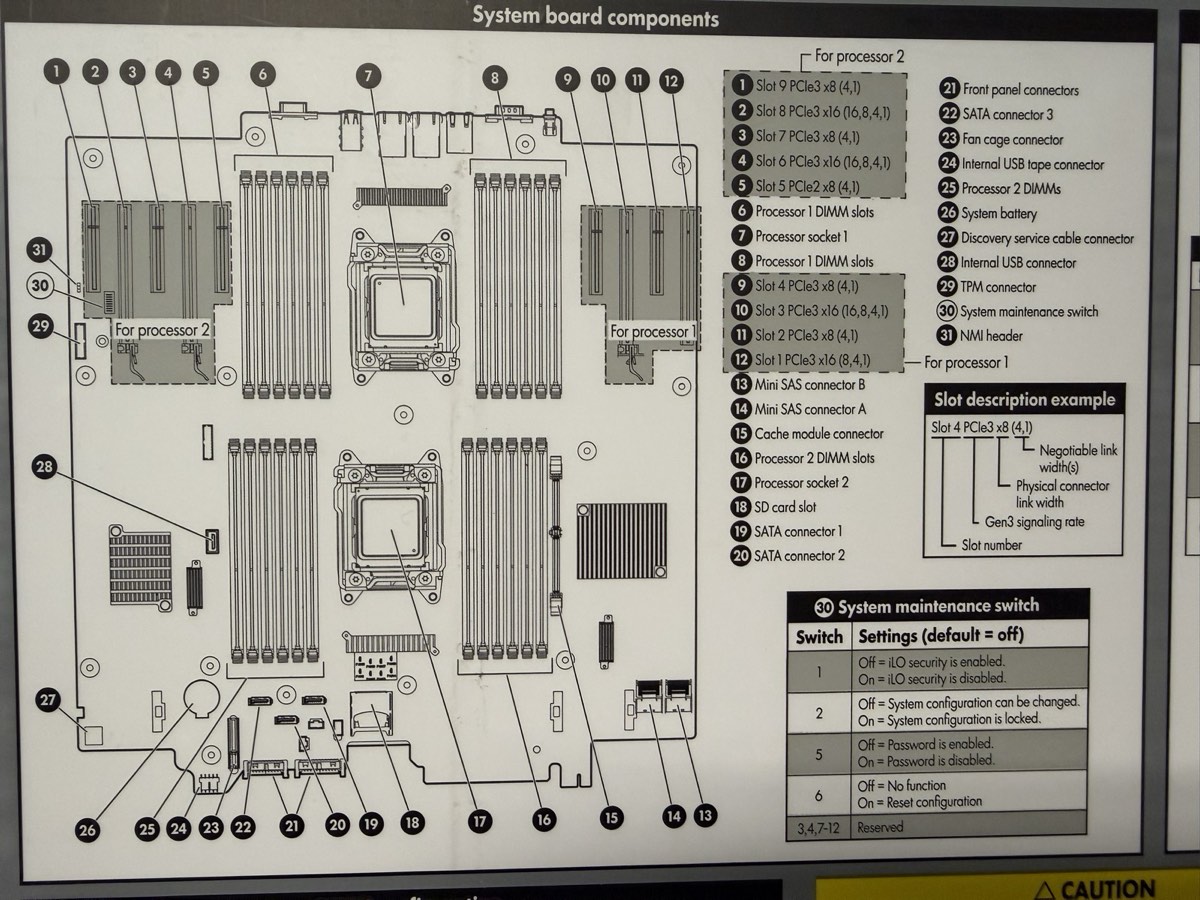
System board — 2 CPU sockets, 24 DIMM slots, P420i RAID, PCIe risers
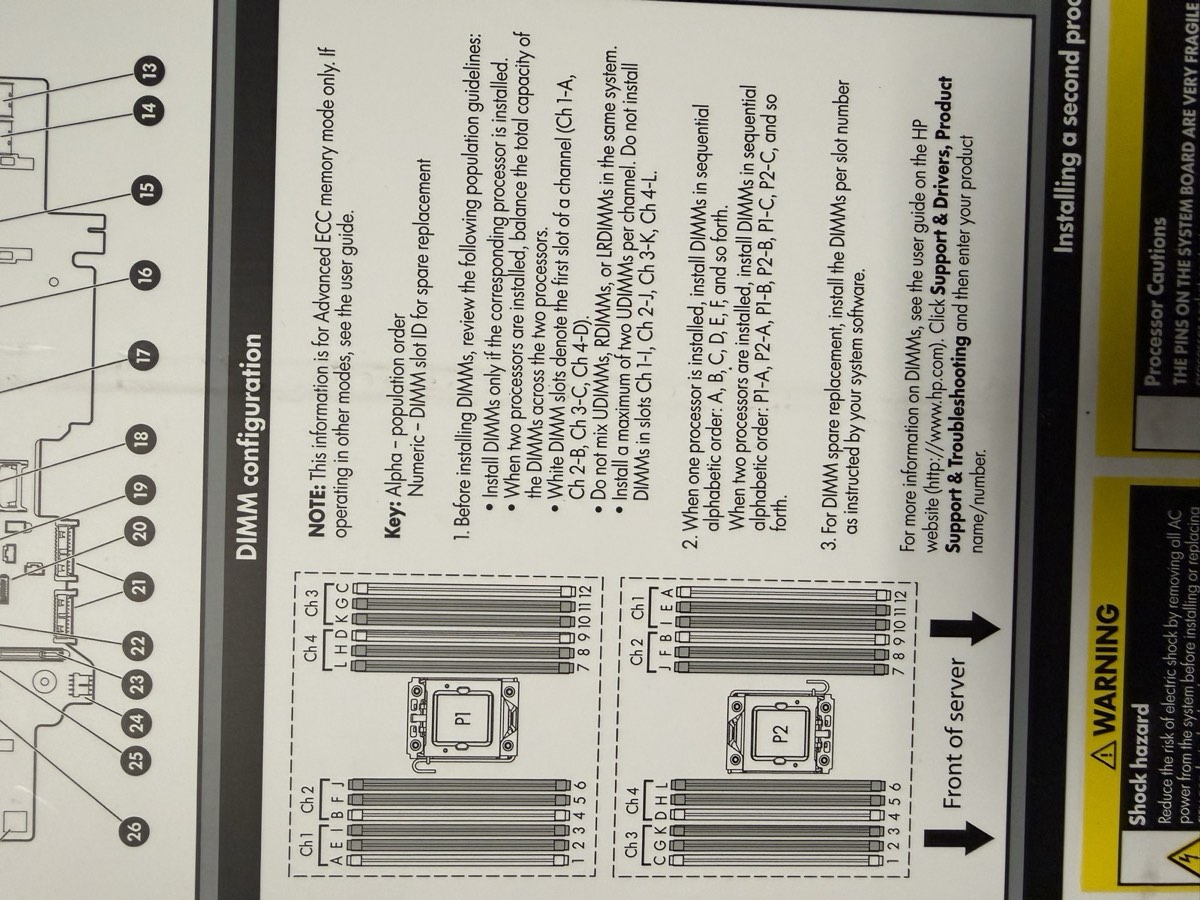
DIMM population chart — white slots first, matched pairs, balance across channels
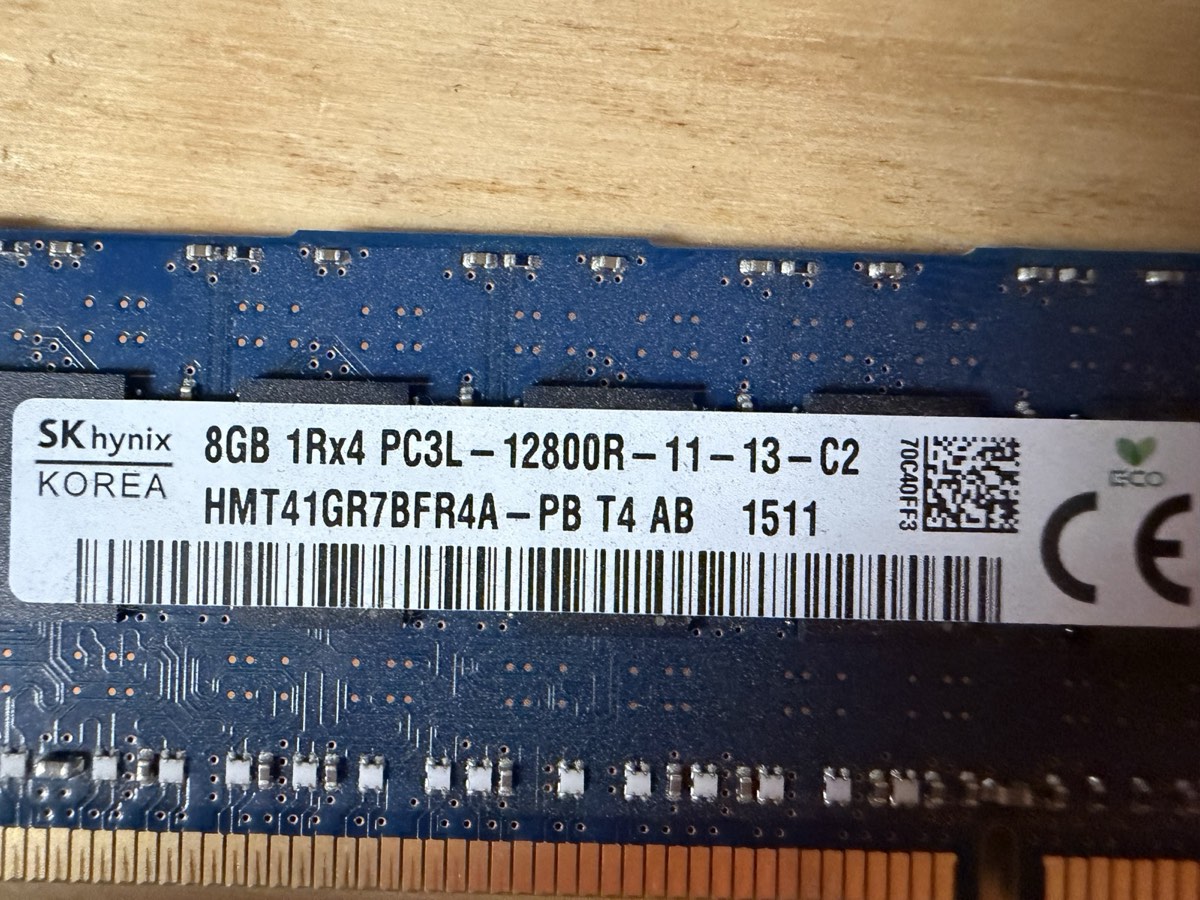
SK Hynix HMT41GR7BFR4A-PB · PC3L-12800R · DDR3L-1600 ECC RDIMM · 1.35 V
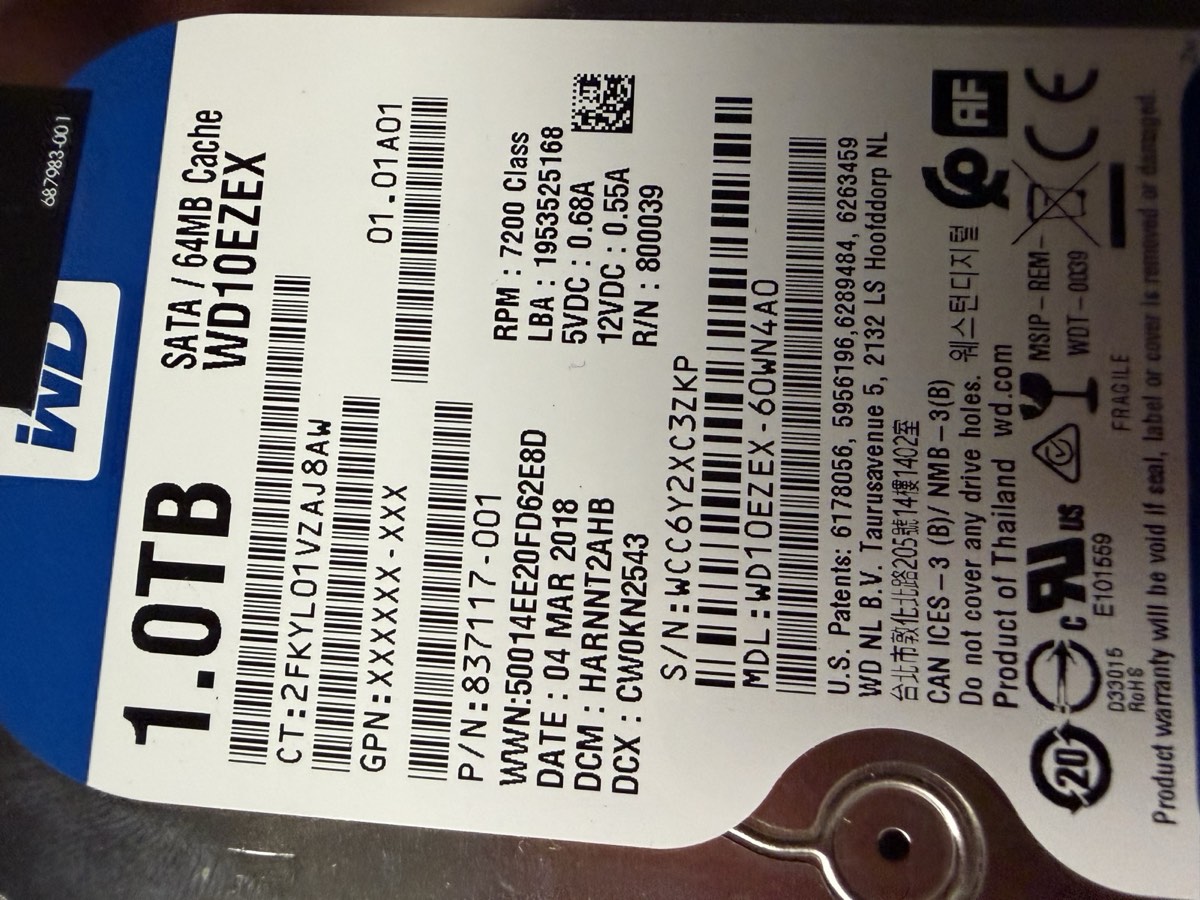
WD10EZEX · 1 TB · 7200 RPM · 64 MB cache · SATA · 2018
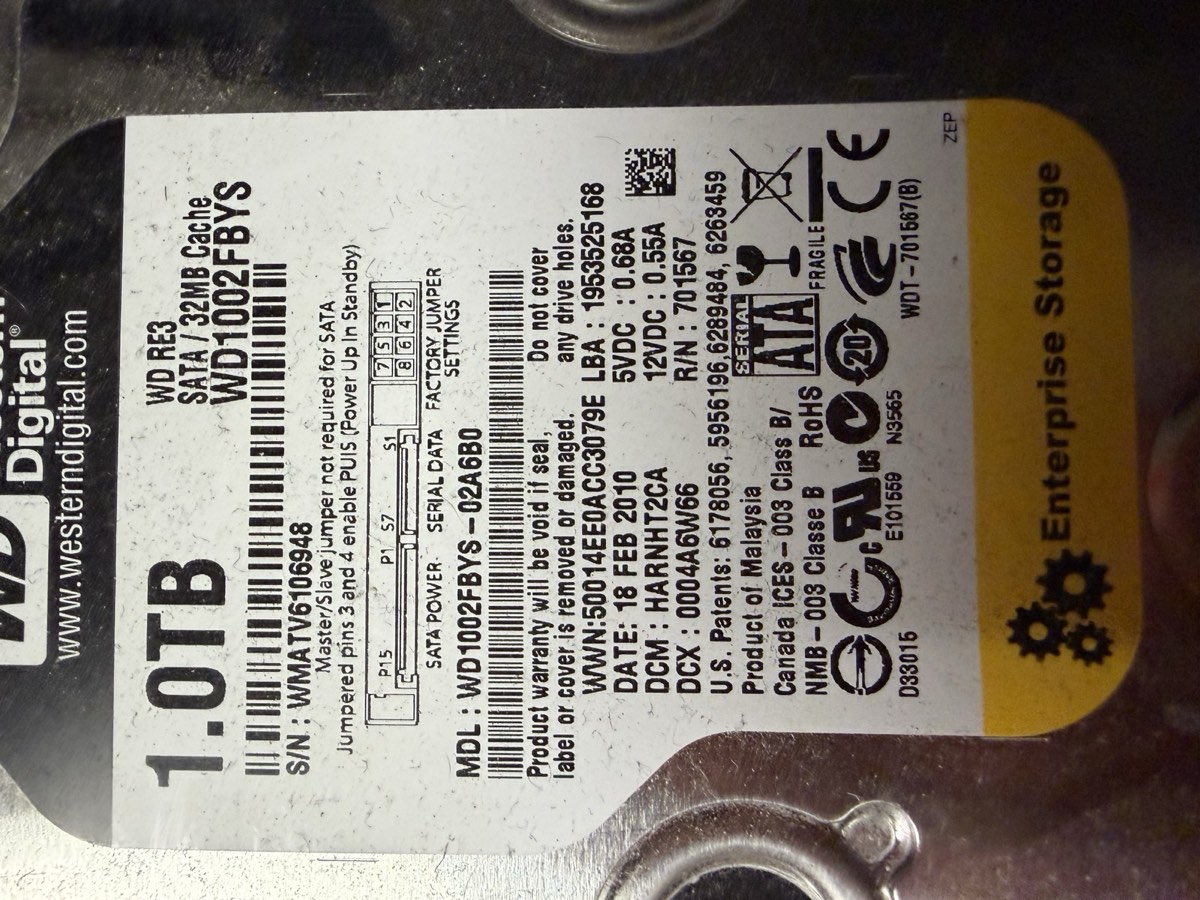
WD1002FBYS · 1 TB · 7200 RPM · 32 MB cache · SATA · 2010
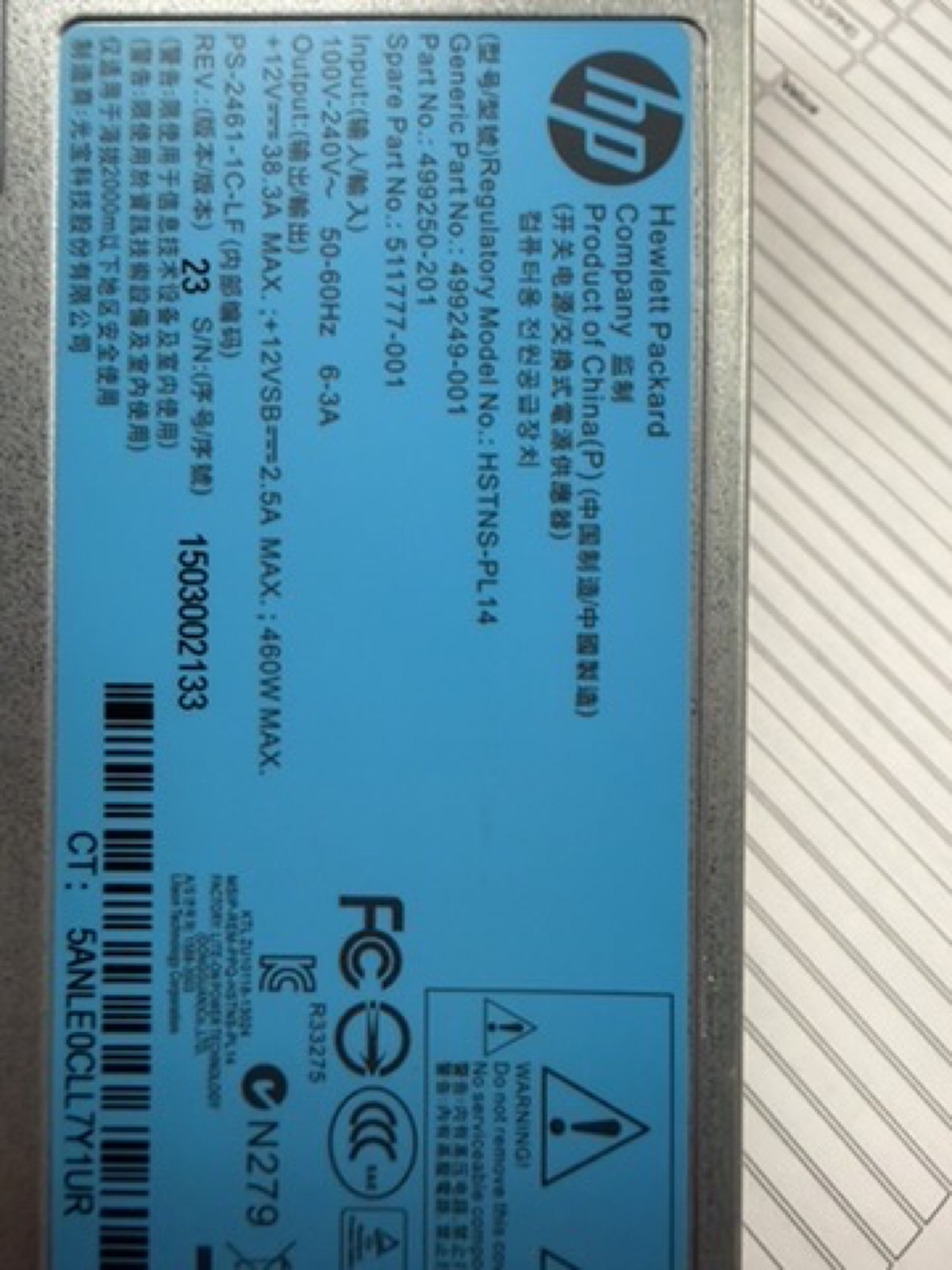
HP HSTNS-PL14 · Gold Common Slot · p/n 511777-001
Additional: 1× Xeon E5-2609 v2 (socket 1); 3rd 1 TB drive in bay 3; P420i RAID controller onboard; iLO 4 management
| CPU | 1× Xeon E5-2609 v2 |
| Cores / threads | 4C / 4T (no HT) |
| Base clock | 2.50 GHz (no turbo) |
| L3 cache | 10 MB |
| Socket 2 | empty |
| VT-x / VT-d | ✓ |
| Installed | 32 GB = 4× 8 GB |
| Type | DDR3L-1600 ECC RDIMM |
| Effective speed | 1333 MT/s (IMC cap) |
| Slots used | 4 of 24 · quad-channel ✓ |
| NUMA nodes | 1 (single CPU) |
| Controller | Smart Array P420i |
| Firmware | 8.50.66.00 |
| Cache | FBWC capacitor (likely 512 MB) |
| Drives | 3× 1 TB SATA 3.5" (3 TB total) |
| Bay locations | Port 11, Box 1, Bays 1–3 |
| Onboard NIC | HP 331i (Broadcom BCM5719) |
| Ports | 4× 1 GbE |
| PXE / SR-IOV | ✓ / ✓ |
| Remote mgmt | iLO 4 (dedicated RJ-45) |
| PSUs | 2× 460 W 1+1 |
| Model | HP HSTNS-PL14 Gold |
| Input | 100–240 V · 50/60 Hz |
| Fans | 4 hot-plug redundant |
| BIOS | P72 · 08/02/2014 |
| Bootblock | 03/05/2013 |
| SATA Option ROM | v2.00.CO2 (2011) |
| NIC Boot Agent | Broadcom NetXtreme (2014) |
| Boot mode | Legacy |
10.10.0.0/16 · GW 10.10.10.1 · iLO + Proxmox UI + updates
172.16.0.0/24 · public-facing · Web + Jump box
192.168.0.0/24 · trusted · AD + DNS + DHCP + SQL
| Level | Usable | Protection | Verdict |
|---|---|---|---|
| RAID 0 | 3 TB | None | Rejected |
| RAID 1 (mirror) | 1 TB | 1 fail | Too little space |
| RAID 5 | 3 TB | 1 fail | Chosen ✓ |
| RAID 6 | 1 TB | 2 fails | Needs 4 drives |
⚠ Caveat: drives are mismatched — WD Blue (2018, consumer, no TLER) + WD RE3 (2010) + a 3rd. Operate at the slowest member's speed; the oldest drive is statistically most likely to fail first. Weekly SMART checks recommended.
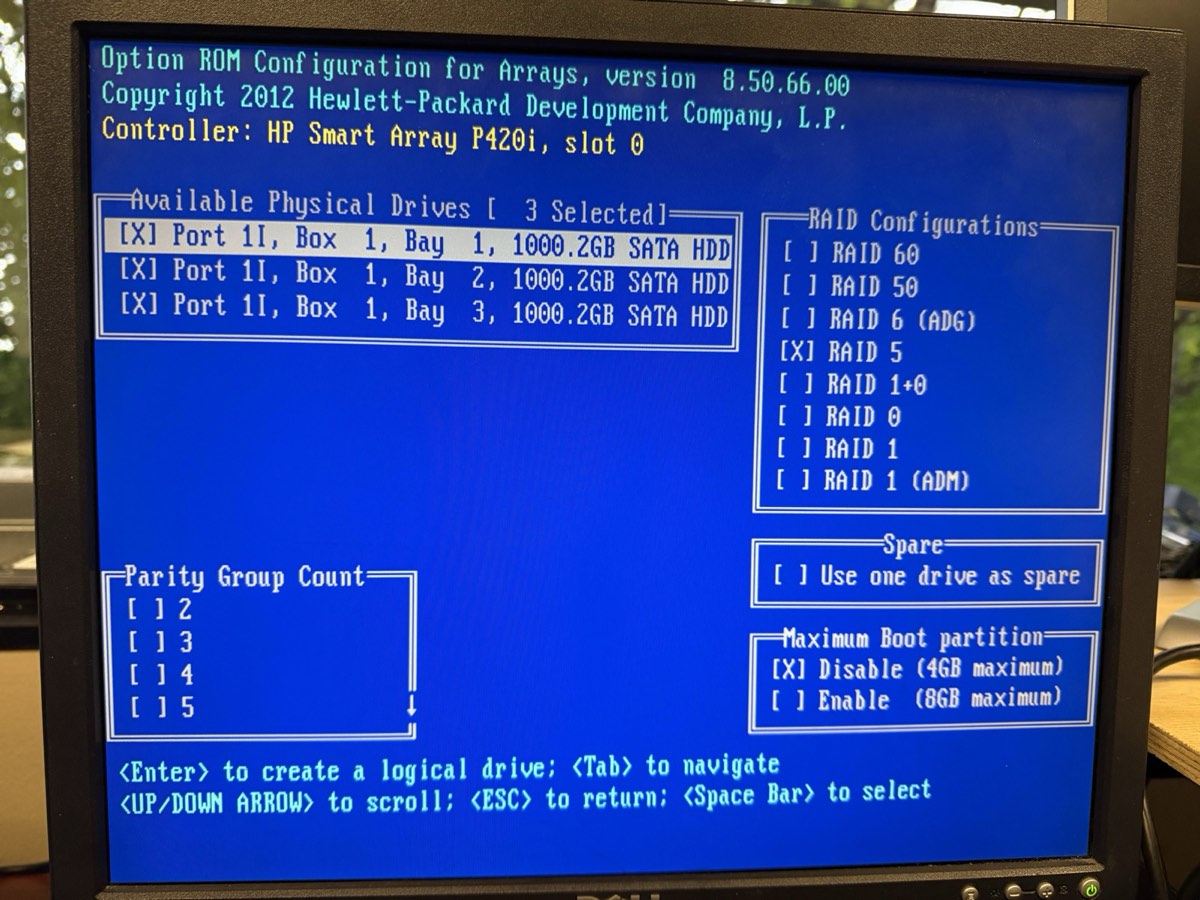
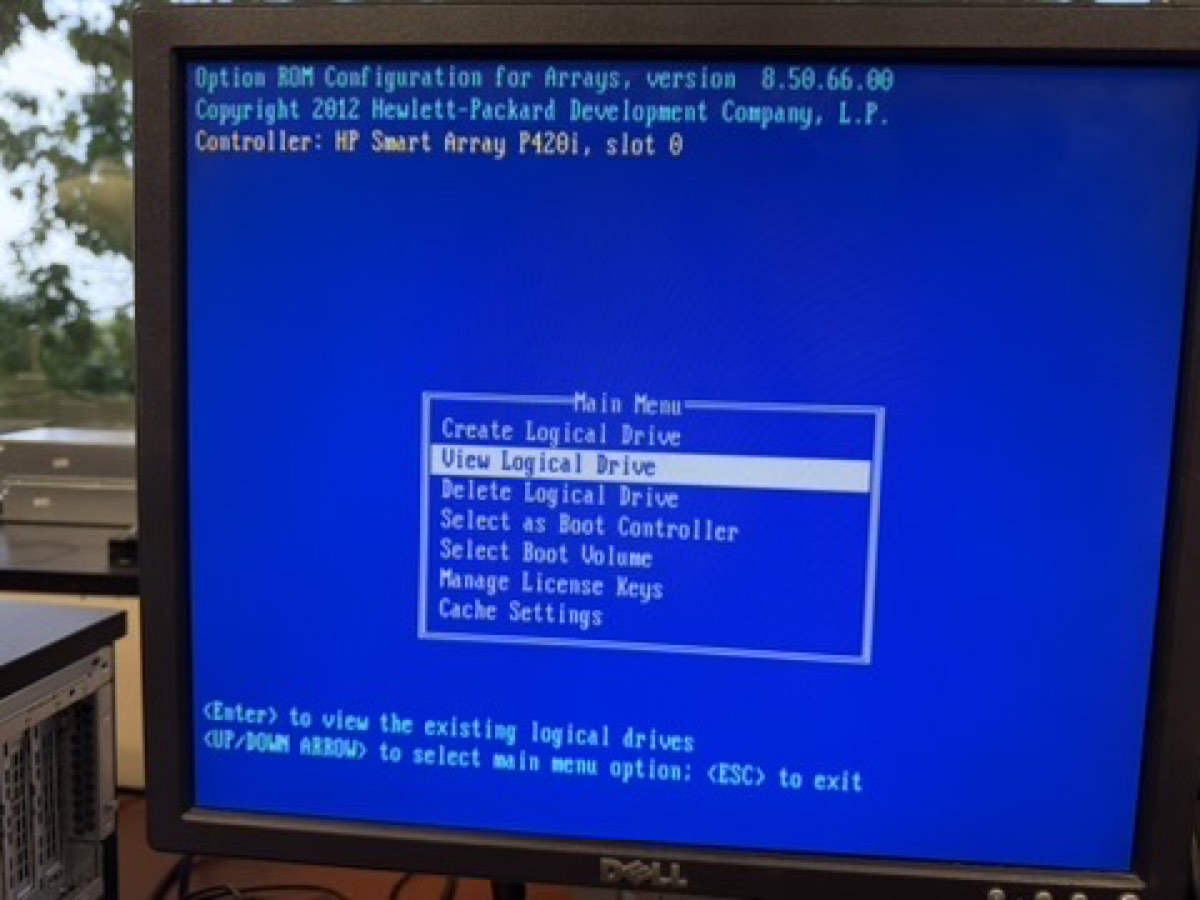
3 drives marked [X] · RAID 5 selected · Max Boot Partition disabled (4 GB)
Result: 1 logical drive · 3 TB total (one drive's capacity reserved for parity) · parity initialization began in the background.
↑ ORCA main menu after creation — "View Logical Drive" is now selectable, which means an array exists ✓
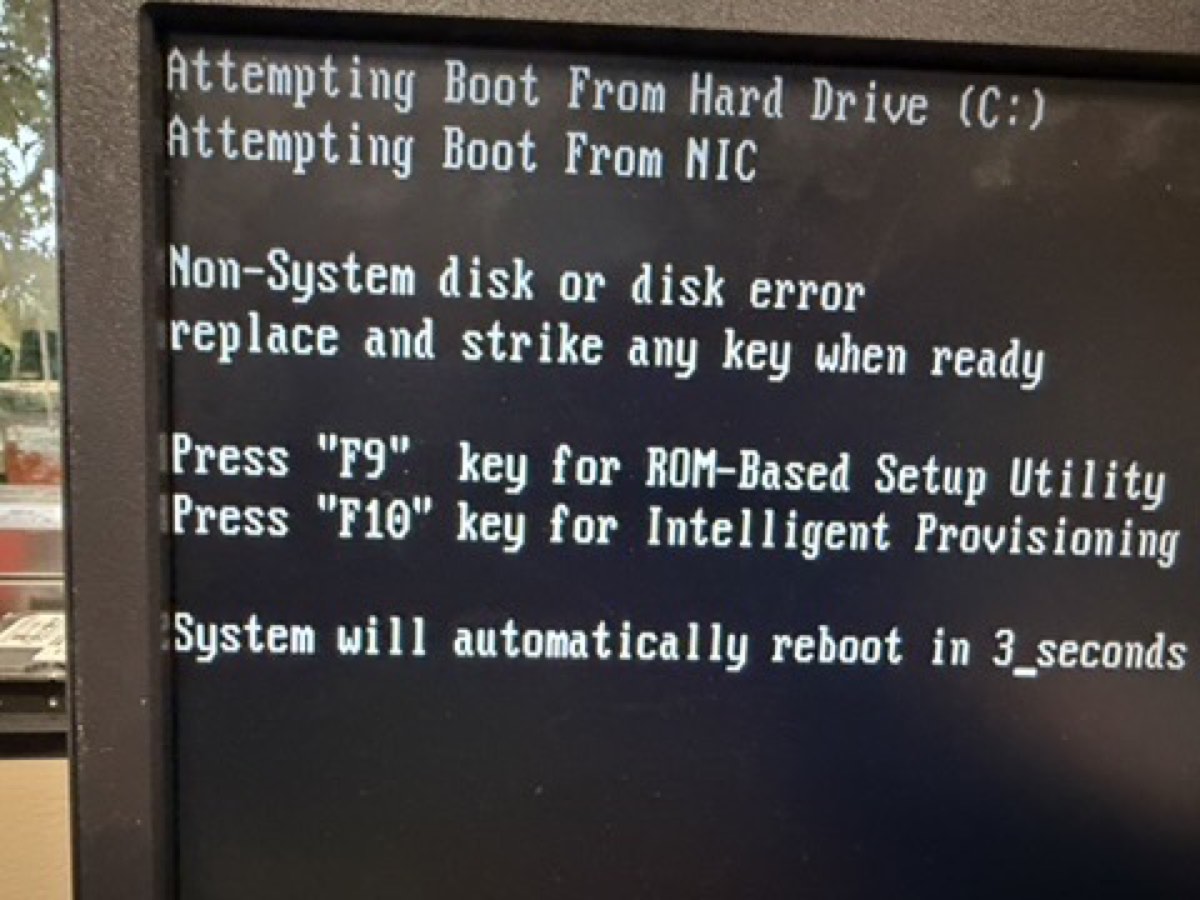
↑ Next boot: "Non-System disk" — exactly what we wanted. Server sees the array as C:, just no OS yet. The 1785 "array not configured" error is gone.
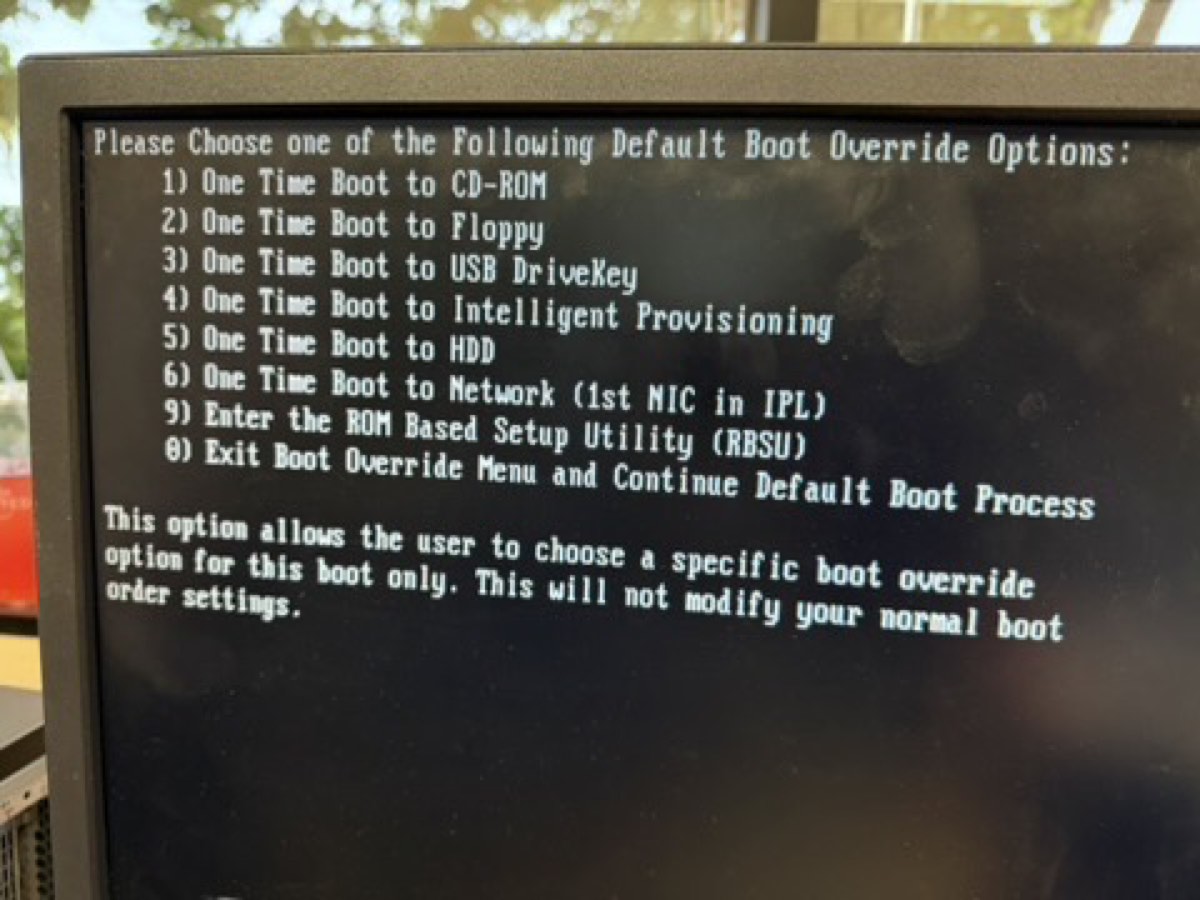
F11 at POST → option 1 (CD-ROM) — iLO serves the ISO as a virtual CD
Proxmox installer loaded — picked "Install Proxmox VE (Graphical)"
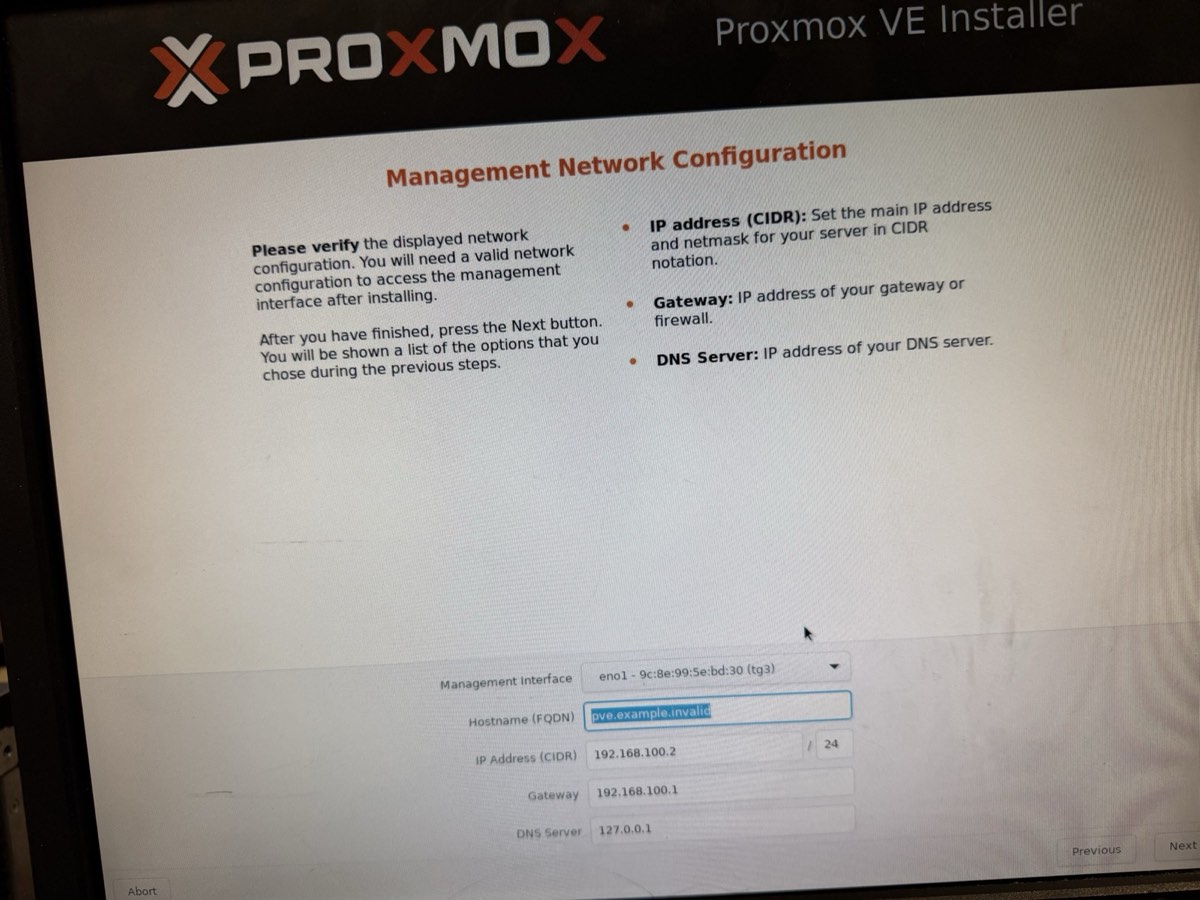
Management network configured on eno1
No USB stick needed — iLO's virtual media mounted the ISO straight from a laptop browser.
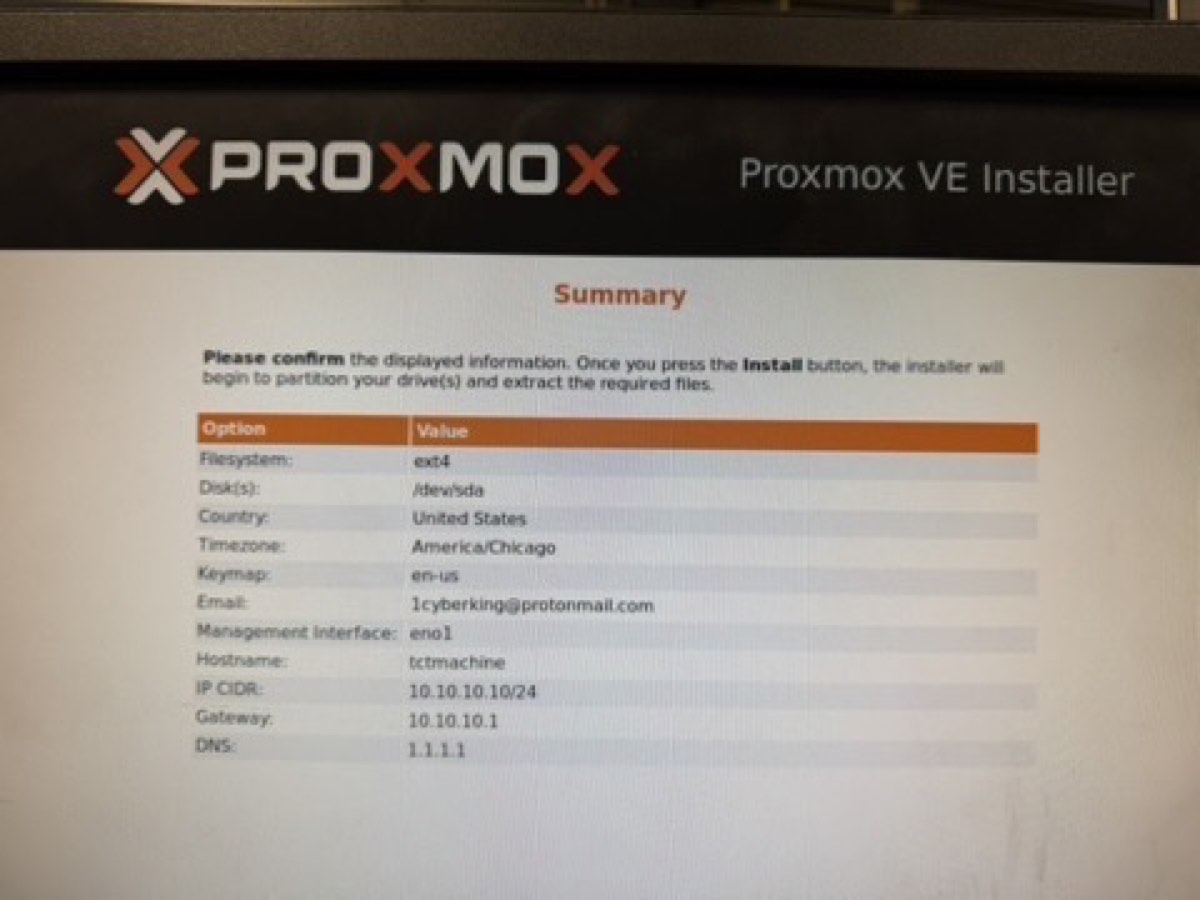
| Filesystem | ext4 on /dev/sda |
| Target disk | 3 TB RAID 5 array |
| Country / TZ | United States / America/Chicago |
| Management NIC | eno1 |
| Hostname | tctmachine |
| IP (CIDR) | 10.10.10.10/16 |
| Gateway | 10.10.10.1 |
| DNS | 1.1.1.1 (Cloudflare) |
Install ran ~5 minutes, unmounted the virtual ISO, rebooted — Proxmox came up on the first try.
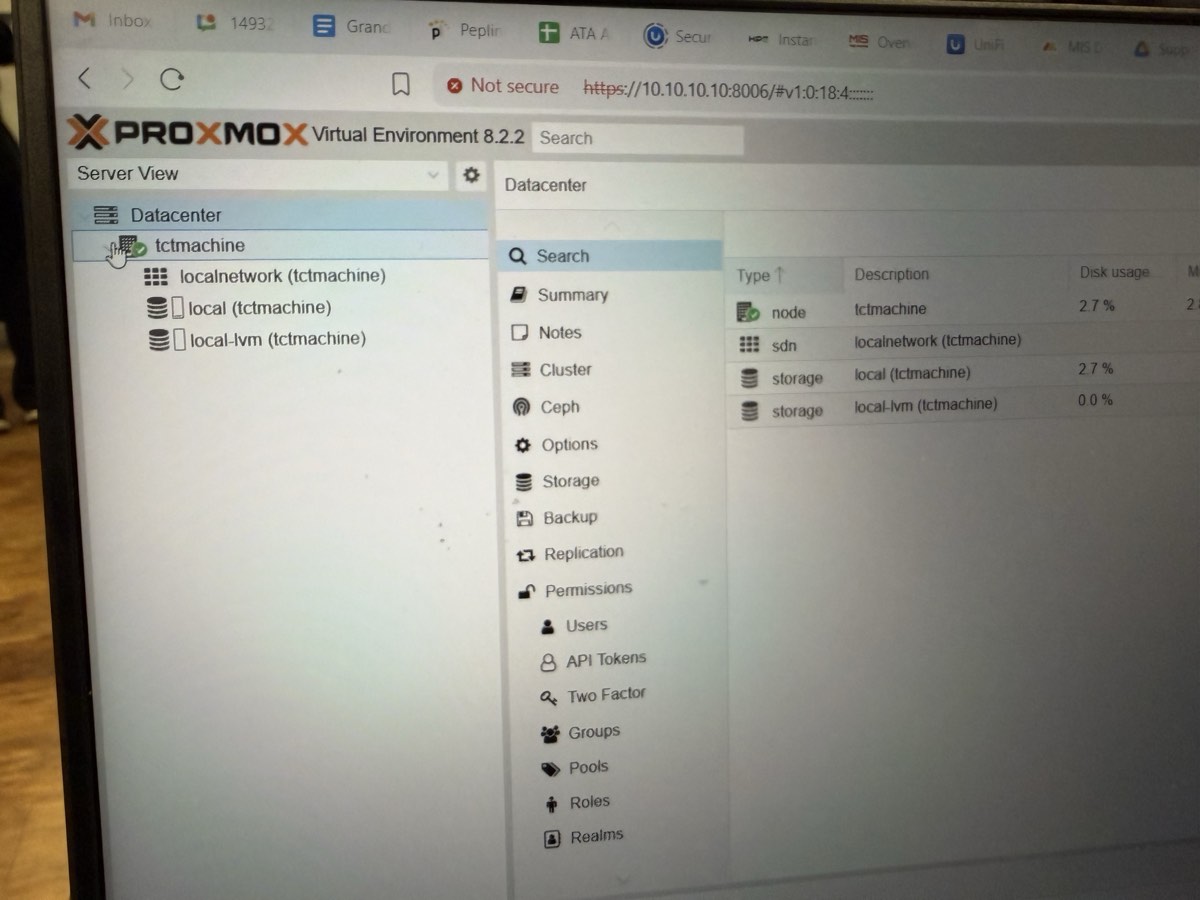
↑ https://10.10.10.10:8006 from a laptop on the school LAN. Logged in as root.
tctmachine online under Datacenterlocalnetwork SDN existslocal storage mounted · 2.7% used (base system)local-lvm thin pool ready · 0.0% used (awaiting VMs)Every layer from iLO up through Proxmox UI is working. The 3 TB RAID 5 array is exposed as local (host root + ISOs) and local-lvm (VM disks). Ready to create bridges and VMs next.
10.10.10.10/16 on eno1https://10.10.10.10:80061.1.1.1)pve01.capstone.local (hostnamectl)apt update && full-upgradeStand up the core services every downstream week depends on — Windows DNS/DHCP/IIS + Linux NGINX/MariaDB — on a NAT-bridged network.
capstone_db| Bridge | Subnet | Host IP |
|---|---|---|
vmbr0 mgmt | 10.10.0.0/16 | 10.10.10.10 |
vmbr1 DMZ | 172.16.0.0/24 | 172.16.0.10 |
vmbr2 LAN | 192.168.0.0/24 | 192.168.0.10 |
| Windows Server | 192.168.0.2 (vmbr2) |
| Linux Server | 192.168.0.3 (vmbr2) |
| DMZ Web / Jump | 172.16.0.10–20 (vmbr1) |
| DHCP scope | 192.168.0.50 – .100 |
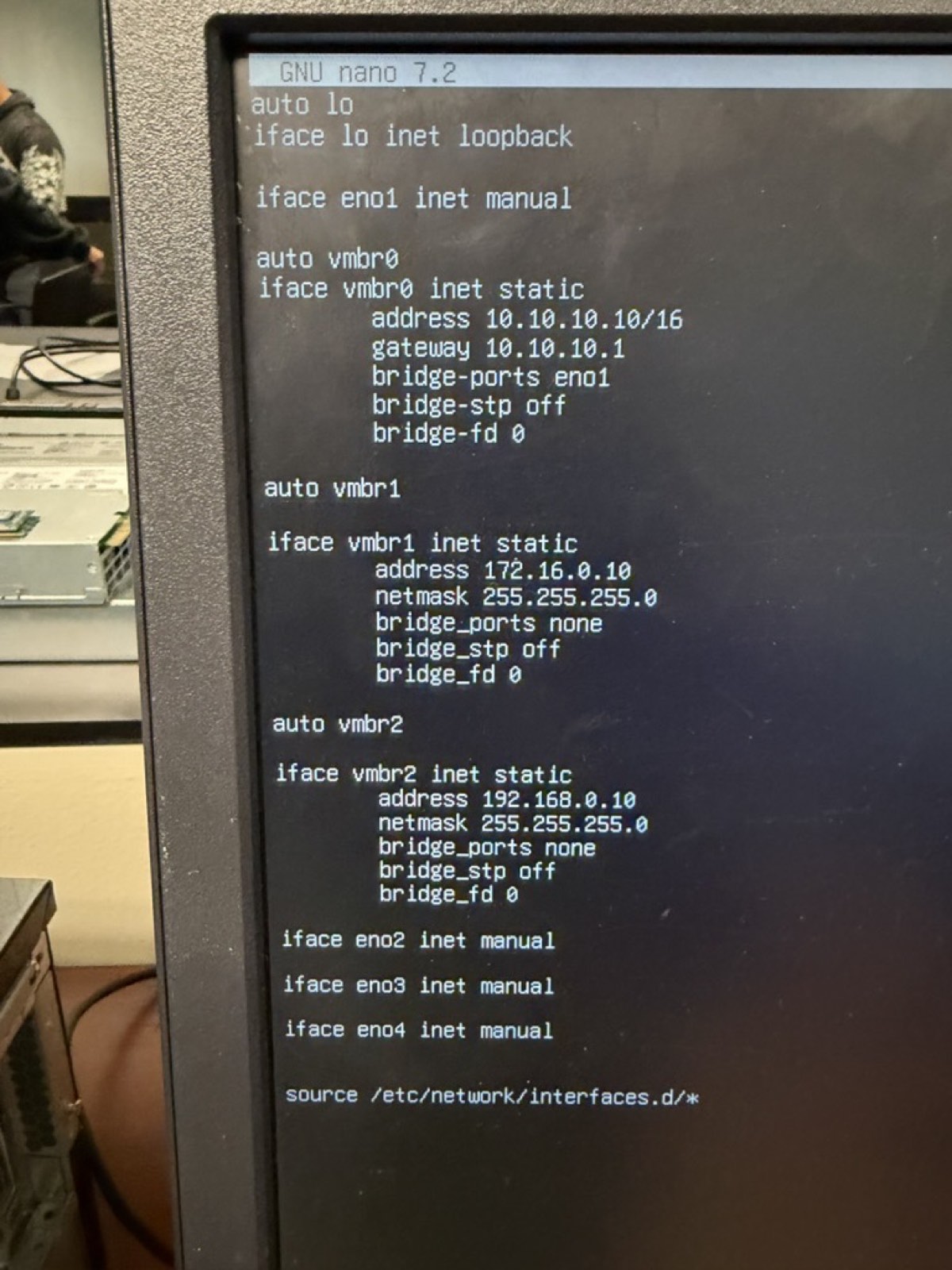
✓ Typo fixed — iface vmbr2 inet static. Proxmox GUI shows vmbr0/1/2 all Active=Yes, Autostart=Yes.
auto vmbr0
iface vmbr0 inet static
address 10.10.10.10/16
gateway 10.10.10.1
bridge-ports eno1
bridge-stp off
bridge-fd 0
auto vmbr1
iface vmbr1 inet static
address 172.16.0.10
netmask 255.255.255.0
bridge-ports none
bridge-stp off
bridge-fd 0
auto vmbr2
iface vmbr2 inet static
address 192.168.0.10
netmask 255.255.255.0
bridge-ports none
bridge-stp off
bridge-fd 0
After saving: ifreload -a — verify with ip addr show vmbr1 and ip addr show vmbr2.
# self-tests — bridges are up? ping -c 2 172.16.0.10 # vmbr1 self ping -c 2 192.168.0.10 # vmbr2 self # once VMs exist: ping -c 4 192.168.0.2 # Win VM (vmbr2) ping -c 4 192.168.0.3 # Linux VM (vmbr2) ping -c 4 172.16.0.10 # DMZ Jump (vmbr1)
| From → To | Record |
|---|---|
| Host → Win VM | ___ ms |
| Host → Linux VM | ___ ms |
| Host → DMZ | ___ ms |
Windows VM cmd:
ping 8.8.8.8
expect < 30 ms
Linux VM bash:
curl https://ifconfig.me
→ returns school public IP
If fails: confirm IP forwarding + iptables MASQUERADE on vmbr0 egress, VMs have correct gateway (192.168.0.10 for LAN, 172.16.0.10 for DMZ).
teamx.localwinserver · IP 192.168.0.2 · ✓ create PTRnslookup winserver.teamx.local
Address: 192.168.0.2
| Name | CapstoneScope |
| Range | 192.168.0.10 – .100 |
| Mask | 255.255.255.0 |
| Gateway | 192.168.0.1 |
| DNS | 192.168.0.2 |
| Suffix | teamx.local |
Right-click scope → Activate. Test from a client: ipconfig /release && /renew.
C:\inetpub\wwwroot\iisstart.htm + iisstart.pngindex.html<html>
<body>
<h1>Welcome to Week 2!</h1>
</body>
</html>
# by IP http://192.168.0.2 # by DNS hostname http://winserver.teamx.local
Both should render Welcome to Week 2! as an H1.
📸 Screenshot the browser showing the welcome page — URL bar must be visible.
Troubleshoot: Windows Firewall → allow HTTP (port 80) if the page can't be reached remotely.
sudo apt update
sudo apt install nginx -y
sudo systemctl enable nginx
sudo systemctl start nginx
sudo systemctl status nginx
● nginx.service - active (running)
echo "<h1>Welcome to Linux Week 2</h1>" \ | sudo tee /var/www/html/index.html cat /var/www/html/index.html
# from Windows or Jump Box browser http://192.168.0.3
📸 Screenshot the browser showing the rendered heading.
If blocked: sudo ufw allow 80/tcp · verify IP is .3 · gateway .1.
sudo apt install mariadb-server -y
sudo systemctl enable mariadb
sudo systemctl start mariadb
# optional hardening
sudo mysql_secure_installation
sudo mysql
CREATE DATABASE capstone_db; CREATE USER 'capuser'@'localhost' IDENTIFIED BY 'securepass'; GRANT ALL PRIVILEGES ON capstone_db.* TO 'capuser'@'localhost'; FLUSH PRIVILEGES; EXIT;
mysql -u capuser -p -e "SHOW DATABASES;"
| capstone_db |
📸 Screenshot the SHOW DATABASES; output with capstone_db visible.
# Win cmd ping 192.168.0.3 # Linux bash ping -c 4 192.168.0.2
nslookup \
winserver.teamx.local
→ 192.168.0.2
New client VM → DHCP → record the leased IP from Win DHCP Manager.
SHOW DATABASES;
Full walkthrough: week2.html
172.16.0.x, gw 172.16.0.1PermitRootLogin noufw allow 22/tcp from 10.10.10.0/24, 172.16.0.0/24, 192.168.0.0/24# Windows (admin PowerShell) route add 172.16.0.0 mask 255.255.255.0 192.168.0.1 # Linux sudo ip route add 172.16.0.0/24 via 192.168.0.1
# SSH port-forward: WAN :2222 → Jump Box :22 iptables -t nat -A PREROUTING -i vmbr0 \ -p tcp --dport 2222 \ -j DNAT --to-destination 192.168.0.2:22 iptables -A FORWARD -p tcp -d 192.168.0.0/24 \ --dport 22 -j ACCEPT iptables -A INPUT -p tcp --dport 2222 -j ACCEPT # Persist across reboots apt install iptables-persistent netfilter-persistent save # or: iptables-save > /etc/iptables/rules.v4
MASQUERADE for 172.16.0.0/24 and 192.168.0.0/24 out vmbr0 already set in /etc/network/interfaces as post-up lines.
Test: from laptop on school LAN → ssh -p 2222 [email protected] → lands on Jump Box at 192.168.0.2.
| VM ID | 101 |
| Name | jumpbox |
| ISO | ubuntu-24.04.1-live-server-amd64.iso |
| Disk | 25 GB on local-lvm |
| CPU | 1 socket × 2 cores, type host |
| RAM | 2048 MB |
| Bridge | vmbr1 (DMZ), VirtIO |
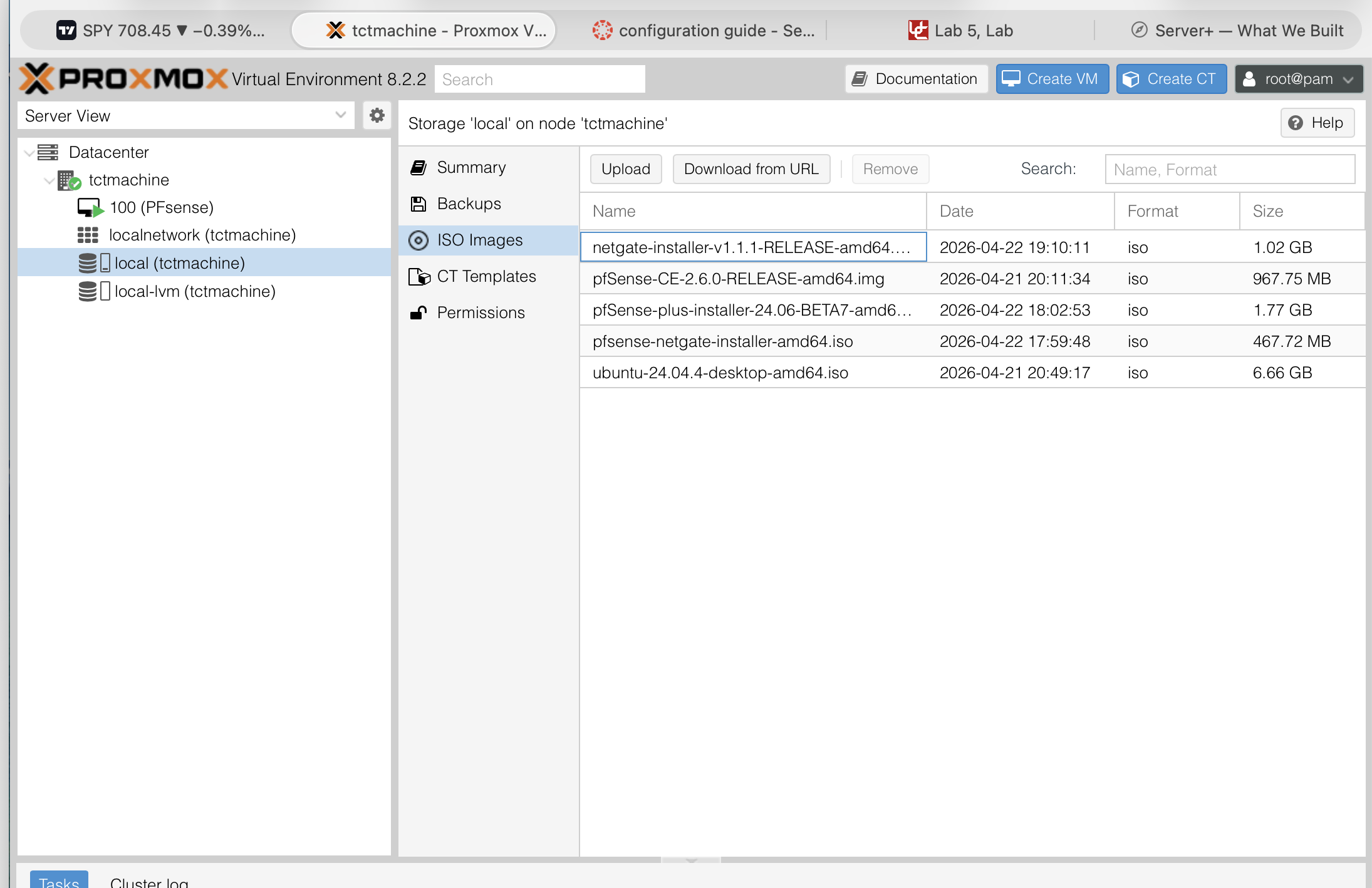
ISO Images storage view (Ubuntu Desktop was already there; Server downloaded next)
| Method | Manual |
| Subnet | 172.16.0.0/24 |
| Address | 172.16.0.2 |
| Gateway | 172.16.0.10 (Proxmox host) |
| DNS | 1.1.1.1, 8.8.8.8 |
| Server name | jumpbox |
| Username | jumpadmin |
| SSH | ✓ Install OpenSSH server |
⚠ Ubuntu installer's autoconfig fails on vmbr1 (no DHCP) — that's expected. Set static manually.
capstone.local)| VM | Purpose | OS | vCPU | RAM | Disk | Bridge | IP |
|---|---|---|---|---|---|---|---|
| VM1 | AD / DNS / DHCP / IIS | Windows Server 2019 | 2 | 8 GB | 80 GB | vmbr2 | 192.168.0.10 |
| VM2 | SQL Server Express | Windows Server 2019 | 2 | 6 GB | 80 GB | vmbr2 | 192.168.0.20 |
| VM3 | Apache + MySQL web | Ubuntu 22.04 LTS | 2 | 4 GB | 40 GB | vmbr1 | 172.16.0.10 |
| VM4 | Jump box / gateway | Windows / Ubuntu | 1 | 2 GB | 30 GB | vmbr1 | 172.16.0.20 |
| Totals | 7 | 20 GB | 230 GB | Leaves ~10 GB RAM for host + ARC | |||
⚠ No Hyper-Threading on E5-2609 v2 — 7 vCPU on 4 real cores = ~1.75× over-subscription, acceptable for lightly-loaded services. Keep CPU-heavy workloads off the same host.
https://10.10.10.10:80061785-Drive Array Not Configured is expected before RAID is built — not an errorpve01.capstone.local is the convention| F9 | System Utilities / RBSU (BIOS) |
| F10 | Intelligent Provisioning (HP installer) |
| F11 | One-time boot menu |
| F8 | Smart Array ORCA (RAID config) |
| iLO 4 | https://<iLO-IP> |
| Proxmox UI | https://10.10.10.10:8006 |
| Zone | Subnet | Gateway |
|---|---|---|
| Mgmt (vmbr0) | 10.10.0.0/16 | 10.10.10.1 |
| DMZ (vmbr1) | 172.16.0.0/24 | host |
| LAN (vmbr2) | 192.168.0.0/24 | 192.168.0.1 |
1785 drive array not configured → build the array1779 capacitor charging → wait ~5 min1794 battery < 75% capacity → replace soon1797 battery failure → replace now
Live server: https://10.10.10.10:8006
HP ProLiant ML350p Gen8 · 1× Xeon E5-2609 v2 · 32 GB DDR3 ECC · RAID 5 on 3× 1 TB SATA (3 TB total)
Proxmox VE 8.2.2 · 2-bridge iptables topology · Cybertex Austin